
Freckle is a free online resource for K-12 teachers to use within their classrooms for math, ELA, social studies, and/or science. It not only engages students in their learning, but also has some great assisting features for students to use and make meaning of their learning. Freckle utilizes the Common Core State Stanadards (CCSS) to assist teachers in planning for which lessons to present to students. Below is a video that provides an overview as to what Freckle is and how it works.
When teachers create a free account, they will be given a class code for each class they set up. Students use the code along with their first and last name to log in and begin their lessons. The pictures below are examples of what students will generally see within each lesson. Each lesson has some type of assistive or adaptive technology feature to guide students through their learning. The blue boxes give examples of adaptive items students can use that allow them to create their own learning by drawing (pencil icon) or dragging (numbers and/or other manipulatives located on the page). The red boxes show adaptive auditory and video resources students can use to enhance their learning.

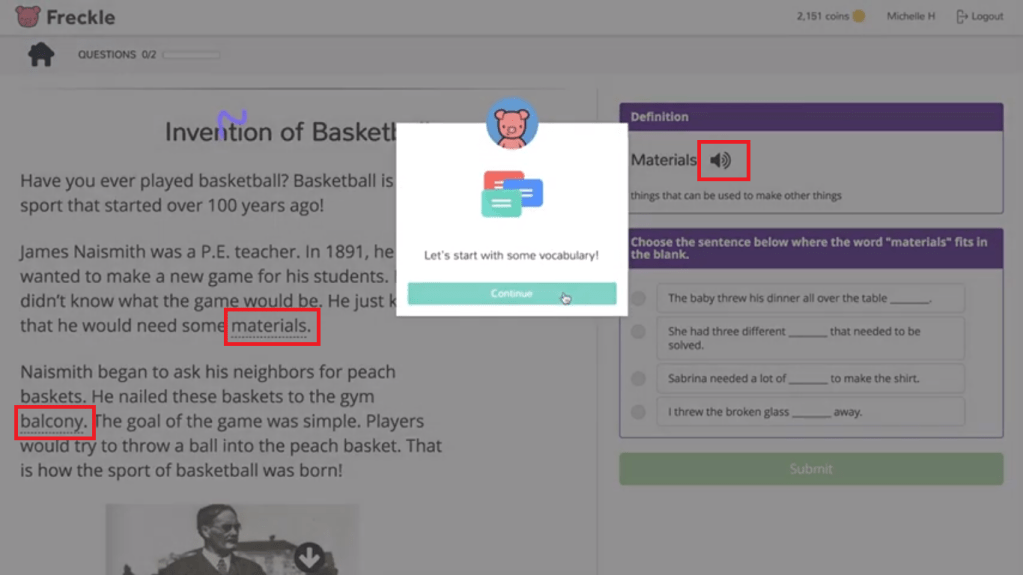
These lessons are just examples of what a typical lesson may look like for a student. For math, depending on the question within the lesson, there may be other adaptive tools like manipulatives (rulers, clocks, money, base ten blocks, counters, etc.) for students to utilize. For ELA, the teacher could also assign writing assignments based on the reading lesson where students can type in their response or use a voice tool to create their response.
When students struggle within a lesson, videos and sometimes underlined definitions will pop up that explain the content in a different way to give students another chance to obtain the correct answer. Struggling students are also able to utilize other class members that Freckle suggests (based on who has mastered the content) to assist the struggling students in their learning.
Freckle embodies some principles of universal design (Spina, 2017), including:
- Flexibility in Use- students can access Freckle on a computer or iPad and have a variety of assistive resources to complete tasks
- Simple and Intuitive Use- access to and use of Freckle is easy to follow and understand with the multitude of adaptations available for students
- Low Physical Effort: content is displayed on a computer or iPad screen and student use minimal effort to complete tasks, such as drag-and-drop answers, voice tools, and other creation tools
Copeland suggests educators must “find creative, alternative means of satisfying established standards and criteria for student learning,” (2011, p. 69). Although Freckle is not advertised as an adaptive technology resource, it allows students to take on their own learning through various assistive and adaptive tools that allow students to create, explore, and engage in their learning. School librarians and teachers of any K-12 subject should highly consider implementing this resource into their classroom.
Other helpful resources for teachers or classroom librarians:
References:
Copeland, C. A. (2011). School librarians of the 21st century. Knowledge Quest, 39(3), 64-69.
Spina, C. (2017). How universal design will make your library more inclusive. School Library Journal. Retrieved from https://www.slj.com/?detailStory=how-universal-design-will-make-your-library-more-inclusive
 All Things: School Libraries
Hi Rachel,
This looks like an amazing tool! I already took a peek, and it looks like Freckle works K-12, so I will definitely check out how I can use this in my classroom. We are working toward a blended learning model, and adaptive technology is a huge component in the quest to better personalize learning. I’m hoping the free version has enough functionality that I won’t fall in love with something I can’t afford. From what I can tell, the reporting piece (for long-term) is extra, but I can live without that.
When I first started teaching, it was so daunting to differentiate, since that often meant creating several different levels of tasks for different groups. With technology, this has become much easier to accomplish, especially with the advent of tools like Freckle or No Red Ink, which allow students to work at their own pace and on the skills that they need most. I’ve been trying to incorporate more station rotation, which I’m sure as an elementary school teacher, you are very familiar with. I’m not sure why it is underused in secondary ed, but I’ve found that those are some of my favorite days. I am freed up to conference and help individuals, and the students stay engaged the whole time. It’s been a revelation.
Again, thanks for highlighting a tool I have never heard of! I’m excited to see what it can offer.
~Linda Mackay
LikeLike
Linda,
I really hope it can be resourceful to you for your older kiddos. I know my little ones love it and we use it almost daily in our classroom! It definitely is part of my small group rotation as it is a great resource to use for technology integration for individualized learning.
Thanks for stopping by!
Rachel
LikeLike
Hi Rachel,
Freckle looks like a very interesting tool for assistive learning! When I return to public schools, I will have to look into it further. One thing I notice is that this tool is compatible not only with a computer, but with iPads as well. That makes it all the more attractive as it is flexible for multiple platforms. I also like how it requires minimal work from students to use as it makes use of drag and drop and voice tools. I may have simply missed this, but is it also compatible with smart phones? Thanks so much for sharing!
David Ballinger
LikeLike
David,
I do not think it is compatible with smart phones. I am not sure if it could work via the Clever app that can be downloaded on smart phones- I’ll have to look into that! I feel it is definitely something worth looking into. My students love it and are very engaged in their learning.
Thanks for stopping by!
Rachel
LikeLike
Rachel,
Thank you for writing your blog post on Freckle! This app comes on my district’s iPads, but I have never actually used it. I did not know much about it and it isn’t a required app that we must use. After reading your blog post on how it can be an adaptive technology resource, I can see how this app would be helpful for students across different levels. I love that students can use tools for math and that it can read things aloud to them. This would be great for my school since we have several ESOL students! Thank you for sharing!
LikeLike
Marie,
Freckle is awesome for ESOL students and struggling students as well. I have noticed that across the board all my students really enjoy using the app! It is definitely something worth looking into in the least. It is very easy to set up and assign lessons if you want.
Thanks for stopping by.
Rachel
LikeLike
It is fantastic that the program attempts to scaffold lessons after incorrect responses. Instead of a student providing wrong answers and then moving on, they are encouraged to keep trying.
The voice to text feature is also great for students who either have difficulty with motor skills or (for other reasons) lack confidence in their typing ability.
LikeLike
Eric,
I absolutely love both of these features because it truly assists students who have difficulty learning certain concepts. I did not really think of Freckle as an adaptive or assistive tool until last week’s readings and I feel very fortunate that my district offers this resource.
Thanks for stopping by.
Rachel
LikeLike
Hey Rachel,
Great tool. Enjoyed your blog. We have some similar programs for math and reading, but this product shows some flexibility in its subject options and we should definitely look at it for our schools.
Thanks so much,
Jennifer Gibson
LikeLike
Jennifer,
It’s definitely worth looking into.y second graders love it and I’m sure middle and high schoolers may enjoy it as well. I like the option to assign or highlight certain topics or standards to really get students to understand and master content.
Thanks for stopping by!
Rachel
LikeLike