Featured

Interview with a Librarian: Danielle West

Danielle West is the school librarian at Aynor Middle School. The interview process with Danielle took a bit longer than expected as her daughter contracted COVID during the time we were scheduled to interview. Thankfully, I was able to get with her last week and ask questions regarding the AASL standard “Inquire”. I really enjoyed talking with Danielle and gaining a different perspective on a librarian’s role with middle school students.

The questions I asked Danielle were as follows:

Questions:

  1. What are some examples of the ways in which you are implementing these competencies in your library program?
  2. What are some of the resources in your library program that you are using to implement these competencies?
  3. Do any of the competencies that you are implementing include collaboration with classroom teachers? If so, please provide examples.
  4. What are some of the challenges that you face when trying to implement these competencies?
  5. Are there any other comments that you would like to make regarding the Shared Foundation / Competencies and Domains?

The answers Danielle provided to the questions above are outlined below:

  1. Danielle informed me that she walks students through the research process each year according to the research topics they are required to do in their content-area curriculum. She provided an example with the curriculum she provides for National History Day. This is Aynor Middle School’s NHD website that Danielle created for her students to guide them through the process (see the NoodleTools and Research pages for specific examples). Last year, Danielle and her students did a weekly school-wide inquiry topic to get students to think a little deeper and do their own research. She mentioned that if schools go back face to face 5 days a week sometime this school year, she will do a weekly school-wide debate topic with her students. Danielle wanted to change it up this year and get students researching and thinking about their stances on certain topics, such as: masks vs. no masks; virtual vs. face to face; homework vs. no homework; dress code vs. no dress code; vaccine vs. no vaccine; banning violent video games or not; cell phone radiation; screen time effects; social media pros and cons; banning animal testing or not, pros and cons with genetically modified organisms (GMOs), etc.
  2. Danielle said she uses NoodleTools to keep track of student research. Aside from NoodleTools, she also relayed she compiles resources and lessons as needed.
  3. When collaborating, Danielle often does so with ELA, Science and SS teachers. As for collaborating on inquiry, she conveyed she usually tries to focus on the bigger research projects like soil and water conservation and National History Day research projects to tie in lessons on bias, reliable sources, databases, etc. She occasionally picks smaller unit topics to tie in inquiry lessons as well. This could be a quick lesson on why students think a certain thing happened in history to get them to formulate a question. She also ties in lessons on evaluating a website in the process.
  4. Danielle expressed she is very fortunate that her teachers see her as a co-teacher and value her lessons and the input she gives them. In a normal school year, she relayed that she sees all students weekly through ELA classes and is able to accomplish these goals with ease. If students need to learn a topic through another content area, those content area teachers come instead of ELA teachers on those specific weeks. I thought this was really awesome! For example, if Danielle needs to work with students on something they are covering in SS, the 7th grade SS teachers will bring the classes that week instead of the ELA teachers. Danielle says that she and the teachers all work very well together in managing this. She shared that she has talked to many other librarians who struggle with teachers who say they do not have time to come in for library visits. She stated that in this case, she thinks it is necessary to constantly try to build those collaborative relationships and remind teachers of her role as a collaborator and teacher. She noted she usually focuses on ELA and Social Studies, but will occasionally work with science teachers on topics like soil and water conservation. She informed me that her main challenge, especially this year with a hybrid schedule, is securing the face to face time with the students to accomplish goals because their time is limited to less than an hour once a week, which also makes it difficult to go as in-depth as she would like with the lessons.
  5. Danielle noted that the AASL standards are essential components to any library program and said it is our responsibility as the School Library Media Specialists to ensure that our students learn to question and formulate their own questions, teach them to find reputable sources of information, and teach them to identify biased sources with an agenda. She takes as many opportunities as possible to get her students questioning the who, what, when, where, and especially the why. She relayed that her two main goals are (1) to put the right books in the hands of her students so they develop a love of reading and (2) help them develop a love of inquiry and researching things on their own.

I found Danielle’s perspective on the duties and responsibilities of the SLM so inspiring. In our district, it is rare that teachers rely on the help of the SLM to supplement or collaborate on lessons, so to hear that her teaches want her help and she makes great strides to help them is very exciting to me! I know I will be keeping her advice in mind as I prepare to become a school librarian.
Featured

Interview with a Librarian: Jennifer Neafsey

I was excited to talk with Jennifer Neafsey, the school library media specialist at Loris Middle School, about how she uses the AASL Shared Foundation “Engage” with the students in her school. I am more familiar with how school libraries function within elementary schools, so I was eager to learn more about school libraries on a middle school level. I am glad I was able to have a conversation with her because it gave me some insight and ideas for ways I could engage students in the future as a school librarian.

The questions I asked Jennifer were as follows:

Questions:

  1. What are some examples of the ways in which you are implementing these competencies in your library program?
  2. What are some of the resources in your library program that you are using to implement these competencies?
  3. Do any of the competencies that you are implementing include collaboration with classroom teachers? If so, please provide examples.
  4. What are some of the challenges that you face when trying to implement these competencies?
  5. Are there any other comments that you would like to make regarding the Shared Foundation / Competencies and Domains?

The answers Jennifer provided to the questions above are outlined below:

  1. Jennifer informed me that she works closely with the 8th grade students when they work on National History Day research projects. She relayed these projects specifically require in depth research of primary and secondary sources, so it is necessary she works diligently with them. She said this is important also because students learn how to cite sources appropriately and why it is important. She provided another example, saying that she works with 7th graders on their Soil & Water Essays, adding these also require use and proper citation of research. With 6th graders, she conducts a simple biographical research project, and introduces basic citations for students to start practicing on their assignments and projects.
  2. Jennifer conveyed that all students in Loris Middle school utilize Discus and WorldCat to locate reliable sources any time they are completing an assignment or project.
  3. I was glad to hear Jennifer confirm that all of her lessons are collaborations with classroom teachers. She noted that sometimes the collaborations are extensions of what teachers are doing in the classroom.  She also attends weekly department planning sessions to stay aware of what topics and standards are being addressed in the classroom, which I thought was really great!
  4. The biggest challenge Jennifer noted is weaning the students off of Google. They have discussions on how information consumers consider the purpose of the search and she compares this logic for students by asking, “Is it for a good recipe for chicken or do we have to back up an opinion in an essay for a teacher?” She noted a second challenge that is prominent for her in her library, which is teaching all students the skill of paraphrasing information. She says it is difficult for students to understand that paraphrasing involves changing more than just one word. She noted all students struggle with this skill every year and it can be difficult to teach them how to understand this concept.
  5. With regards to extending personal learning, Jennifer conveyed she collaborates with teachers on multimedia projects.  She stated that teachers want to provide students with choices when presenting information so she assists them with this. With Jennifer’s help, the teachers can provide students with multiple choices to create products throughout the year such as podcasts, animations, movies, and more to present their learning. 

In talking with Jennifer, I realized there are several differences when it comes to elementary school libraries and middle school libraries. The challenges, collaborations, and teachings have such a diverse range of needs. This made me confirm my previously understood notion that it is crucial for elementary school librarians to not only engage in lessons with teachers and students, but become deeply engaged with student learning, so they are prepared for the next learning stage. This is also why I have always wanted to be an elementary school librarian from the start–I want to instill knowledge, a love for reading, and 21st century skills in the youngest of students so they carry these capabilities through their growth academically and as a person.

Featured

Interview with a Librarian: Julia Brown

Julia Brown, from Green Sea Floyds Elementary School in Green Sea, South Carolina provided me with great insight and information regarding her work as it pertains to the AASL Standards for school librarians. In the interview, I asked Julia five questions that discuss what the day-to-day events look like for her when using the domain “Include”. I chose this domain because I feel like it is such an important aspect for the entire school community to be a part of. Julia was quite excited to share her knowledge and experience with me and, in turn, I was able to take away meaningful information and learn about new skills that I cannot wait to apply to myself once I become a school librarian.
The questions I asked Julia were as follows:

Questions:

  1. What are some examples of the ways in which you are implementing these competencies in your library program?
  2. What are some of the resources in your library program that you are using to implement these competencies?
  3. Do any of the competencies that you are implementing include collaboration with classroom teachers? If so, please provide examples.
  4. What are some of the challenges that you face when trying to implement these competencies?
  5. Are there any other comments that you would like to make regarding the Shared Foundation / Competencies and Domains?

The answers Julia provided to the questions above are outlined below:

Answers:

  1. Julia provided some examples of how she implements inclusion in her library program. One is when she is conducting a read-aloud to students, she ensures that the resources are inclusive for all. For example, during her read-alouds in the library, she reads books with diverse characters featured in the story. Another example is when she teaches her lesson on fairy tales, she exposes students not only to the traditional version, but to several other versions of the fairy tale from different cultures. One other way she includes diversity in her library program is having students read and research how other cultures celebrate holidays or what different celebrations they may have instead. Another way she implements inclusion is for students in grades 3-5, where Julia conducts an inclusive activity where students begin library class with a fun debate about preferences (such as eating at McDonald’s or Wendy’s or going to the beach or the mountains). During these debates, students are able to share their opinions and responses with one another while maintaining respect. Lastly, Julia informed me that the digital citizenship curriculum she uses through Common Sense Media asks students to put themselves in different scenarios as the bully and the victim and think through what those people may be feeling. Students must decide what the best response would be for each scenario. They also must give advice to friends based on fictional scenarios they are given.
  2. Julia offered information about some of the resources she uses in her library program to implement inclusion. Firstly, she uses the Multicultural Fairy Tales book series books by Cari Meister during her fairy tale unit so students can be exposed to, understand and empathize with other cultures and their version of well known fairy tales. She also uses the Follow Me Around book series by Wiley Blevins to enhance social studies curriculum and expose students to different countries and cultures around the world that they may not be familiar with. In doing this, she hopes to give students a new perspective and more inclusive worldview. Julia also uses various books from multicultural award lists, such as Pura Belpré Award Winners and Coretta Scott King Award winners in her library program to implement inclusion. She introduces these books to students in hopes to get them excited to read stories about others like them or of others different from themselves. Lastly, Julia ties in the South Carolina Social Studies Standards and Curriculum into her lessons for grades 3-5 to enhance student learning and supplement what they learn in their classrooms via their teacher.
  3. When asked about collaborating with teachers, Julia had a lot of input. She mentioned that when second graders are studying people and cultures, she collaborates with teachers to implement a lesson on cultural celebrations. When the second graders are in the library, she reads them books and lets them explore books about traditions and celebrations in other cultures. Students then research and explore more information on PebbleGo. When they return to class, they have new facts to share with each other and their teacher during Social Studies. For third grade, she collaborates with teachers on unit about perspectives and respecting others’ perspectives. After they begin discussing this topic in their classrooms, students begin having weekly debates during their library time and share their perspective on a certain topic while respecting others’ perspectives in civil discussions. She also collaborates with teachers in grades 3-5 when they use Skype to communicate with high school students in Kentucky. They discuss the differences in their towns and schools and gain a wider perspective and worldview outside of their community.
  4. Julia highlighted a challenge she faces when implementing inclusion within her library. She noted that since a lot of her students have never traveled beyond their attendance area, it is sometimes difficult for them to grasp the idea of very different places and people with very different beliefs from their own.
  5. Julia had no further comments regarding the Shared Foundations along with the Competencies and Domains.

It was a pleasure to talk with Julia about what she does to ensure that inclusion is a part of her students’ lives in the library. I could tell she is very passionate and serious about her role as the school librarian at Green Sea Floyds Elementary School. I think her students are quite lucky to have her in their lives.

Featured

Interview with a Librarian: Debra Rogers

Debra Rogers is the school librarian at Daisy Elementary School in Loris, South Carolina, the school where I am a second grade teacher. I was eager to collaborate with Debra because I have witnessed the great work she does with our second graders and I have also heard a lot of great things from other teachers about the learning experiences she provides for our students. I asked Debra five questions that detail what what the day-to-day events look like for her when using the domain “Explore” from the AASL Standards for school librarians. I chose this domain because I think it is crucial for students to further their learning through questioning and inquiry. Debra was happy to share her knowledge and experience with me about this domain and I feel as though I was able to take away a lot of great information and ideas to use once I become a school librarian myself.

The questions I asked Debra were as follows:

Questions:

  1. What are some examples of the ways in which you are implementing these competencies in your library program?
  2. What are some of the resources in your library program that you are using to implement these competencies?
  3. Do any of the competencies that you are implementing include collaboration with classroom teachers? If so, please provide examples.
  4. What are some of the challenges that you face when trying to implement these competencies?
  5. Are there any other comments that you would like to make regarding the Shared Foundation / Competencies and Domains?

The answers Debra provided to the questions above are outlined below:

  1. For implementing exploration in the library, Debra gave many great examples. Firstly, she mentioned how she likes to get students curious about reading and exploring their interests through hosting morning book clubs, conducting book talks (either from herself or by students), creating fun and engaging bulletin boards that promote reading, and giving students hands on and digital projects, such as book trailers created by students after reading a title. She also enjoys giving students hands-on activities to encourage fun learning. Some of her favorite (and students’ favorite) hands-on activities include creating dioramas from a scene in a story using legos, paper, or other various media, STEM activities that reinforce what students have previously learned through read-alouds (like creating a chair from paper and tape that can support a small stuffed animal after reading the story “I Am Not a Chair”), and creating digital projects that students share with their classmates. Debra mentioned that students absolutely love sharing and collaborating with one another on the projects they create. She informed me that she feels it is her duty and responsibility as a school librarian to lead and guide students as they investigate and explore in finding answers to questions they are trying to answer. Lastly, Debra highlighted information regarding book talks for student exploration of personal interest. She imparted that having students create and share their own book talks with their peers is a great way to promote reading for personal enjoyment.
  2. Debra discussed some of the resources the library program uses to implement exploration from students. Students are encouraged to explore and utilize the resources available in the physical collection of the library as well as use digital resources, such as Follett Destiny and Destiny Discover, to browse the library collection. Additionally, with the current climate of our school setting due to COVID-19 and our hybrid scheduling, students in grades 3-5 as well as some students in grade 2 have been putting books on hold and checking out eBooks as well for reading purposes. Students in grades CD-1 are browsing books from a mobile cart Debra brings to their classrooms each week. In doing this, students are able to explore on their own the resources that interest them either for their own pleasure or personal learning experiences. Debra shared that she felt it was her responsibility to provide new titles, opportunities, technologies and other resources to students in order to keep the media center up to date to allow students as well as staff members the opportunity to grow within our ever changing world. 
  3. In regards to implementing student exploration through teacher collaboration, Debra shared a few ideas. She said that teachers often ask her to cover a certain skill or topic in the library during their scheduled library time that correlates with what is being taught in the classroom. During this time, Debra will usually have students complete research by exploring various print or digital resources. Students will then organize their work in a graphic organizer or write about the information they have gathered and create projects through various digital resources such as Google Slides or Keynote. This allows students the opportunity to explore, create, and share their learning. She also visits classrooms where she works one-on-one with students or as a whole group.  She noted that working with the students as they read and learn new things is wonderful because she can see the excitement they exude about what they are learning.
  4. As far as challenges, Debra mentioned that her biggest challenge is when students need probing to guide them in the right direction when exploring resources or topics. She noted that some students either get distracted, feel stuck in the beginning of their learning, or show no interest in the exploring and creating of their own learning.
  5. Debra provided a closing comment about the Shared Foundations or Competencies and Domains within the Foundations. She expressed that the Foundations along with their Competencies and Domains are needed in order to create lifelong learners and foster learners’ curiosity within the library program.  She encouraged me to stay abreast in order to keep up with the new technologies and challenges that are constantly coming along with all the changes in our world today.

It very much enjoyed talking with Debra about what she does to ensure that exploration is a part of her students’ learning in the library. It is obvious she has created a welcoming, inquisitive learning space for students in her library. She has so many wonderful and practical activities that allow students to further their learning experiences through exploration and inquiry and I feel that because of this, she will make an impact on student lives. She is a great librarian and I see the product of this in our students’ faces and conversations with her at our school, whether it be in the library, our classrooms, or in the hallways.

Featured

SLIS761 Reflections

This course has been, by far, one of my most favorite SLIS courses I have taken thus far! My biggest takeaway from this semester is that each week I looked forward to an in-depth learning of new concepts and technologies to save and use when I become a school librarian. I have learned a great deal about the importance of technology integration within school libraries and classrooms. Students need a voice in their learning to make meaning. I learned it is the duty of the school librarian, as a school leader, and the classroom teacher to make this possible for students through technology, whether it is assistive technology for all students, AR/VR technologies, or students creating videos with green screens, podcasts, animations, etc. that show they are learning while also giving them the power to take on their learning by creating.
This world is not going to slow down in the technology realm, so it truly is crucial our 21st century learners not only understand how to manage and maneuver in the world today, but also in the future. This cannot happen if our students are not exposed to and learning from new, relevant technologies. We, as future school librarians, cannot allow them to fall behind and we must be their technology advocates so that our world can continue to evolve and grow it bigger, better ways.

Thank you so much, Dr. Green, for a wonderful semester and the plethora of information I have gained from you and cannot wait to use!! 🙂

Featured

Take Your Class on Expeditions!

Expeditions by Google is an Augmented Reality (AR) and Virtual Reality (VR) app that not only takes students around the world to explore and learn about various places and topics related to the arts, science, history and more, it brings concepts that are abstract to reality through 360° scenes and 3D objects. I have already downloaded the app and, since I do not have access to a VR viewer currently, I am exploring the AR features and it is pretty cool! After my school is done with Spring Break, I plan on using the app with my second graders for virtual field trips and various science and social studies topics.

Expeditions is a free app on Google Play and the App Store. The AR and VR settings are both free to explore, but to engage with the VR, a VR viewer must be used. Google Cardboard is a VR viewer that works for smartphones with screen sizes that are 4 to 7 inches wide and is priced very reasonably (around $15). The Daydream View VR viewer only works with certain phones such as Google, Samsung, Motorola, and a few others, but it is a bit pricey (around $100). There are other VR viewers from Google that are reasonably priced (between $6-$40, although most products are in the $10-$20 range) and work similarly to Google Cardboard. With the AR setting, you use the physical space around you to project objects in 3D and the 360° view. There is not extra gadgets or costs for the AR setting, which may be beneficial for teachers or school librarians as it can be used anywhere you are.

This video shows how Ames Middle School Students used Google Expeditions to visit the Holocaust Museum. The video focuses on the VR aspect of the app but also shows how AR is compatible with students’ learning experience.

On the app, users can select expeditions by topics or by VR/AR capabilities. A search box is also provided for users to search beyond what is provided on the homepage. Expeditions has a library feature that allows users to access tours they have already experienced and to create their very own AR/VR tours. The class feature grants students and teachers access to connect on the same Wi-Fi to take a group tour, lead by the teacher. The teacher can point out specific features on the tour for students to see, click, and learn more about. The teacher can also pause the tour at any moment to have group or partner discussions or independent reflections.

Massis (2015) states, “using such [AR/VR] tools to encourage higher levels of information literacy through all of the combined tools available to them is critical to student success,” because “students are engaged and gain proficient information literacy skills,” (p. 798). Student engagement almost always guarantees student learning, and AR/VR technologies can be a gift for students and teachers who are looking for meaningful learning experiences.

Richard Byrne’s 5 Tips for New Google Expeditions Users gives teachers a great starting point in how to get started with Expeditions in the classroom. Within his post, Byrne includes videos explaining how to use some of Expeditions’ features within the classroom. He also created an excellent video demonstration (below) of how teachers or school librarians can use the class feature to go on an AR/VRtour. This is so amazing because it allows students to go beyond reading information and looking at pictures in a textbook or online. The AR and VR Expeditions “takes” students to the places they are learning about and brings to life objects they are studying.

Expeditions can also be used for quick AR and VR field trips that immerse students in topics they may be learning in social studies or science. Students can “go” on a field trip as a mini-lesson before starting a unit. For example, a science class about to tackle a unit on animal camouflage could view the “Animal Camouflage” and/or “Camouflage” tours on day one of the unit and have partner discussions or write down their observations. Students can be “taken” to over 900 different VR Expeditions and over 100 AR Expeditions.

When thinking about whether or not to purchase VR accessories, I do not think teachers should get in the mindset that student learning is significantly impacted by choosing one or the other. Some may argue that VR is better because it separates you from reality and literally surrounds you in a virtual world that you interact with. It can also be argued that AR is just as meaningful for student learning because they are still learning in a hands-on, descriptive, and interactive way. I do not think that one is better than the other and it depends on each teacher’s classroom needs when deciding whether or not to purchase VR accessories. Goerner (2016) expresses, “AR enhances the information we perceive with our senses…it immerse[s] users into the experience in a way that makes learning more meaningful,” (p. 19). I bought the Merge Cube for my second grade students this school year which, like Expeditions, has both VR and AR capabilities. I chose not to purchase VR accessories this year, but my students (when we were still in school) could not get any more excited to interact with our AR device every day. As long as we, the teachers, make learning fun and meaningful to students, we have been successful in doing our job.

References:

Goerner, P. (2016). Augmented reality. What’s next?. School Library Journal, 62(9), 19-20.

Massis, B. (2015). Using virtual and augmented reality in the library. New Library World, 116(11/12), 796-799.

Featured

Read Alouds to Help You MAKE

Teach Outside the Box is an educational site that includes blogs, a shopping site, classroom tips, and more for all educators. One thing I love about this site is the emphasis on STEM and Makerspaces through blogs. Teach Outside the Box’s Makerspace Blog has a handful of blog posts specifically dedicated to all things Makerspace.

One blog post that stood out to me was Top 10 Read Alouds for Elementary Makerspaces as this did not register as something that could be involved with Makerspaces to me, since, after all, a Makerspace is a space where you, well, “make”. Britton (2012) states, “the biggest limitation is simply the lack of knowledge that this is even ­possible,” (para. 12). I was reminded of this statement as I thought about how read alouds did not stand out to me as being a part of a Makerspace. Therefore I had to investigate to see what this was really all about and if it was even relevant. Upon exploring, I determined relevant read alouds can actually be immensely helpful and quite foundational for Makerspace activities, especially in an elementary school-which naturally made me extremely happy. As future school librarians, we have to be open to finding and willing to accept seemingly unorthodox possibilities that could work for our students in their Makerspace environment. This is especially true for school libraries that may not have certain luxuries such as funding, space, tools or supplies, support from staff or administration, etc.

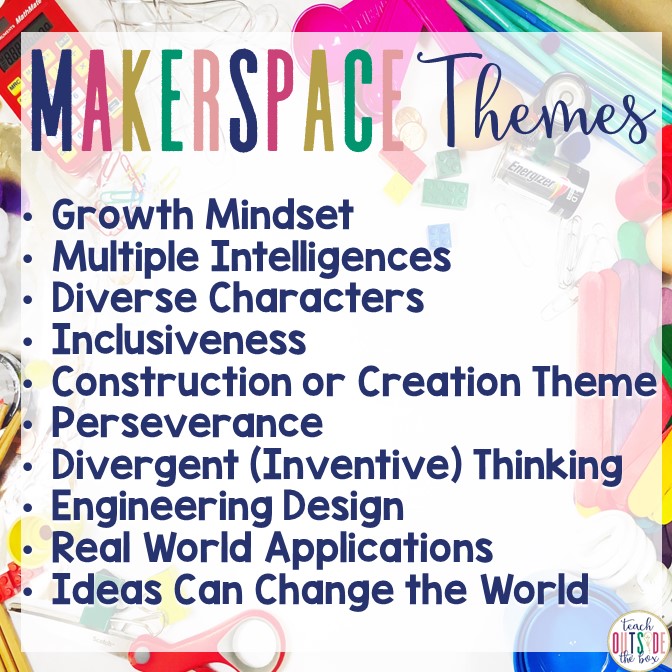
The author of the blog, Brooke Brown, shares themes to look for in books that relate well with Makerspace activities:

Brown goes on with a list of her “Top Ten Read Alouds for Elementary Makerspaces” which includes a summary of the book, why she loves the book, and maker activities that pair nicely with the book. I love that some of the books seem so ordinary, but because they have at least one of the Makerspace themes listed above, they can be incorporated into a Makerspace activity within an elementary school library.

These read alouds along with their paired makerspace activities are honestly perfect to introduce even the smallest of hands to the world of making! Brown’s blog post parallels with Angevine and Weisgrau’s (2015) three core values of agency, authenticity, and audience. With these values and through Brown’s activities, elementary students have an intimate, hands-on learning that is unique to their own experiences (agency), create meaningful projects or real tools that embodies their experiences with life and their community (authenticity), and contextualize or validate their own place in the world as they create something to share with others (audience). When asking the following questions generated from Angevine and Weisgrau, young students really begin to think about, understand, and devlop the purpose of what they are making:

  1. What are you making? (agency)
  2. Why are you making this? (authenticity)
  3. Who is it for? (audience)

My favorite read aloud and activity that I would like to try first is “Whoosh!” by Chris Barton with the Pom Pom Blaster activity. I am anxious to find more read alouds with these themes and come up with my own Makerspace activities. This blog post has made my teacher heart so, so happy and excited to try something new!

I believe relevantly themed read alouds should be put into use in elementary school libraries because I think, when paired with appropriate Makerspace activities, it can be such a strong foundation for young students, even those in early primary. To be able to connect what they are learning with their imagination, creativity, and making skills is so empowering for young, developing minds. What better way to build this concrete way of thinking for our little minds of the world? Just imagine their thought processes and capabilities as they continue to grow and learn!

Other Makerspace blog posts from Teach Outside the Box:

References

Angevine, C., & Weisgrau, J. (2015, September 24). Situating makerspaces in school. Hybrid Pedagogy. https://hybridpedagogy.org/situating-makerspaces-in-schools/

Britton, L. (2012, October 1). The makings of maker spaces, part 1: Space for creation, not just consumption. The Digital Shift. http://www.thedigitalshift.com/2012/10/public-services/the-makings-of-maker-spaces-part-1-space-for-creation-not-just-consumption/

Featured

Get Your Dojo On!

Each school year brings a whole new class of different students than the years before which creates a new classroom environment. Each year, classroom management systems you have used in the past will work again and sometimes they do not. I have used ClassDojo in my classroom since I began teaching four years ago and every year my classes respond well to this web 2.0 behavior management system, more so than other management systems I have spent days creating or came up with on the fly.

ClassDojo is free for teachers and a great way to positively interact with students and parents, who can join your class for free as well. This is a “device agnostic” tool (Moorefield-Lang, 2014) which can be accessed online or through the ClassDojo app (Apple or Google Play) using a computer, iPad, or smartphone. This allows teachers and caregivers the opportunity to use the tool anywhere, anytime.

A quick overview of how ClassDojo works
A deeper look at how ClassDojo works

How to Use ClassDojo:

  • Create your class(es) with student’s first and last names. Once created, each student will be given a fun, colorful Dojo monster avatar that can be changed if you or the student wish.
  • Within each class, you can add positive or negative feedback based on a 1-5 point scale. You can edit the feedback within any class at any point (increase/decrease point value, add new feedback, delete feedback, etc.)
  • Teachers can give feedback to individual students, the whole class, or multiple students at a time.
  • Students can save or redeem points to earn rewards set by the teacher. The rewards could be daily, weekly, or monthly. There is also an option to reset points and start over, if desired by the teacher.
  • Students and teachers can take pictures or videos to upload to the classroom portfolio or individual student portfolios.
  • Caregivers are able to join the class by inputting a code via their smartphone, tablet, or computer to check the feedback their child, pictures/videos posted to their child’s page or the class page, and message (similar to SMS text messaging) the teacher.
  • Teachers can take attendance on the main page so that absent students do not get feedback that day
  • The toolkit feature allows teachers to set timers, randomly group students (there is also a “Don’t group together” feature for students who may not work well together), use a noise meter for classroom noise, and more.
  • Teachers can also create groups (boys/girls, table numbers, etc.) as another way to give feedback to students

Stumbling upon the Elementary Librarian blog, I was exposed to how ClassDojo could actually work within a school library, and I was not disappointed! This podcast from Elementary Librarian was rather helpful in understanding exactly how to use ClassDojo in the library and the benefits the school librarian and students can gain by implementing this system. In the podcast, it is shared that students can learn how to be a good library citizen and learn library skills through providing them with positive feedback on ClassDojo for things like helping keep the library clean and tidy, returning books on time, being careful with resources and materials, etc. One thing to be considered is if the school librarian does decide to use this tool, they will have to create a class for each homeroom class. Although this is time consuming at first, I think it would be a really great benefit in the long run for the library’s management as well as behaviors.

Reasons to Use ClassDojo in School Libraries:

  • Easily establish rules and expectations of school library with students
  • Students can redeem points for fun library treats and incentives (bookmarks, extra time with makerspaces, book fair gift cards, etc.)
  • Parents can get involved in the happenings of the school library via videos or pictures posted by the school librarian
  • Students learn how to become good library citizens as they behave and interact with the library and librarian through a positive, reinforcing way

References

Moorefield-Lang, H. (2014). An exploration and explanation of device agnostic tools. Library Media Connection33(1), 8-9.

Featured

Adaptive Technology Resource

Freckle is a free online resource for K-12 teachers to use within their classrooms for math, ELA, social studies, and/or science. It not only engages students in their learning, but also has some great assisting features for students to use and make meaning of their learning. Freckle utilizes the Common Core State Stanadards (CCSS) to assist teachers in planning for which lessons to present to students. Below is a video that provides an overview as to what Freckle is and how it works.

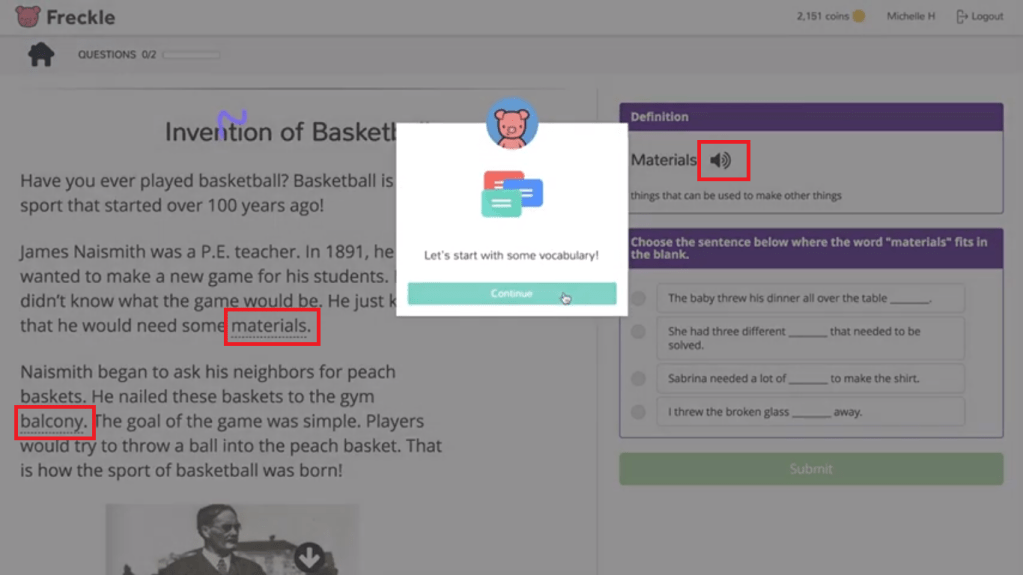
When teachers create a free account, they will be given a class code for each class they set up. Students use the code along with their first and last name to log in and begin their lessons. The pictures below are examples of what students will generally see within each lesson. Each lesson has some type of assistive or adaptive technology feature to guide students through their learning. The blue boxes give examples of adaptive items students can use that allow them to create their own learning by drawing (pencil icon) or dragging (numbers and/or other manipulatives located on the page). The red boxes show adaptive auditory and video resources students can use to enhance their learning.

These lessons are just examples of what a typical lesson may look like for a student. For math, depending on the question within the lesson, there may be other adaptive tools like manipulatives (rulers, clocks, money, base ten blocks, counters, etc.) for students to utilize. For ELA, the teacher could also assign writing assignments based on the reading lesson where students can type in their response or use a voice tool to create their response.

When students struggle within a lesson, videos and sometimes underlined definitions will pop up that explain the content in a different way to give students another chance to obtain the correct answer. Struggling students are also able to utilize other class members that Freckle suggests (based on who has mastered the content) to assist the struggling students in their learning.

Freckle embodies some principles of universal design (Spina, 2017), including:

  • Flexibility in Use- students can access Freckle on a computer or iPad and have a variety of assistive resources to complete tasks
  • Simple and Intuitive Use- access to and use of Freckle is easy to follow and understand with the multitude of adaptations available for students
  • Low Physical Effort: content is displayed on a computer or iPad screen and student use minimal effort to complete tasks, such as drag-and-drop answers, voice tools, and other creation tools

Copeland suggests educators must “find creative, alternative means of satisfying established standards and criteria for student learning,” (2011, p. 69). Although Freckle is not advertised as an adaptive technology resource, it allows students to take on their own learning through various assistive and adaptive tools that allow students to create, explore, and engage in their learning. School librarians and teachers of any K-12 subject should highly consider implementing this resource into their classroom.

Other helpful resources for teachers or classroom librarians:

Freckle is Backed by Research

Case Studies

Freckle Blog

Common Sense Education Review

References:

Copeland, C. A. (2011). School librarians of the 21st century. Knowledge Quest, 39(3), 64-69.

Spina, C. (2017). How universal design will make your library more inclusive. School Library Journal. Retrieved from https://www.slj.com/?detailStory=how-universal-design-will-make-your-library-more-inclusive

Featured

Technology Hardware to Use in the Classroom

We all know integrating technology is not only beneficial to engage students in learning, but to also prepare them as productive, contributing citizens of the 21st century. One piece of technology hardware that may be overlooked but can be quite useful in promoting pedagogical functions in the classroom is a microphone. A microphone can not only be fun for many students to use in the classroom, but it can also be used as a tool to support students’ creativity as they understand and evaluate their own learning via classroom podcasts.

Podcasts are a series of audio recordings, similar to talk radio, that are downloadable and accessed digitally. They can be shared within the classroom, throughout the school community, and even globally. Through podcasts, Riddle states that students are engaged in “discipline-based research, reading, and writing” skills and practice in “editing, oral reading, and present[ing],” (2010, para. 5). Podcasts in the classroom are a great technology integration tool for any grade level K-12 as it allows students to process what they’ve learned and articulate their learning in a creative, meaningful way. Bradbury even suggests that “[p]odcasting is about giving students a voice and showing them that we all have a story to be told,” (2016, p. 47). Podcasts are a great way to show students their voice has meaning and what they have to say is valuable.

Hennig states that students “have improved reading skills when combining listening with reading,” (2017, p. 30). This is important for students across all grade levels because they are simultaneously improving their reading, social, and listening skills.

According to Sebastian Dorok, podcasts are not produced and managed by some elaborate technological skill, but rather they are easy enough for anyone to learn if they are simply just shown how it works (Riddle, 2010, para. 18). Dorok also suggests podcasts provide “a new possibility for bringing education up-to-date—making the learning process simultaneously more exciting and simple,” (Riddle, 2010, para. 18).

Kearny, Schuck, Burden, and Aubusson express that students should generate their own learning contexts and should not be limited to just formal learning environments (2012, pp. 14-15). Setting up a classroom podcast allows students to create and communicate their own learning with others in a collaborative method and informal setting.

The information below shows how teachers and school librarians can integrate podcasts via a microphone into their classrooms. It is based on the Technology Integration Matrix (TIM) from the Florida Center for Instructional Technology (FCIT).

  1. Active
    • Entry: Students are informed of microphone and how it will be used for podcasts
    • Adoption: Students learn how to use the microphone with devices to create podcasts
    • Adaptation: Students work in groups to configure set up and abilities of microphone when used for podcasts
    • Infusion: Students work in groups to create a script and practice with the microphone for audio improvements
    • Transformation: Students work in groups to record and produce the podcast
  2. Collaborative
    • Entry: Students are individually tasked with relating procedures on how to properly use the microphone for podcasts
    • Adoption: Students learn how to enable the microphone via teacher modeling
    • Adaptation: Students work with peers to understand how to physically use and enable the microphone on devices
    • Infusion: Students work in groups to choose appropriate settings and other devices needed to set up the podcast
    • Transformation: Students work in groups to conduct the podcast and give feedback, ensuring each group member has a specific task in production
  3. Constructive
    • Entry: Students learn what exactly a microphone is, how it works, and its various uses in the real world
    • Adoption: Students understand why microphones are used and necessary for podcasts
    • Adaptation: Students independently explore different microphone features and select top three microphones to use for podcasting
    • Infusion: Students work in groups to narrow down selection of microphone needed to use for the podcast
    • Transformation: Students utilize the selected microphone in their podcast, analyzing and applying its features within the production of the podcast

Below are links to some great resources that can help any classroom teacher or school librarian use a microphone to create podcasts in their classrooms:

  1. Equipment and Tools for Producing Classroom Videos and Podcasts from Cult of Pedagogy;
    • This resource gives great ideas about what topics students could talk about on their podcast and what tools you can use before, during, and after producing the podcast.
  2. Creating Podcasts with Your Students from Reading Rockets
    • This resource is helpful in providing ideas of which items you may want to accumulate to start a podcast with students.

References

Bradbury, J. (2016). Podcasts expand classroom walls. Education Digest, 81(8), p. 46-48.

Hennig, N. (2017). Podcasts in context. Library Technology Reports, 53(2), 30-38.

Kearny, M., Schuck, S., Burden, K., & Aubusson, P. (2012). Viewing mobile learning from a pedagogical perspective. Research in Learning Technology20.

Riddle, J. (2010). Podcasting in the classroom: A sound success. MultiMedia & Internet@Schools, 17(1),23-26. Retrieved from http://web.b.ebscohost.com.pallas2.tcl.sc.edu/ehost/detail/detail?vid=6 &sid=2bc0e88-2eac-4353-94d7-2a752e8be5cc%40pdc-v-sessmgr05&bdata=JnNpdGU9ZWhvc3Q tbGl2ZQ%3d%3d#AN=47570643&db=a9h

Featured

Technology Integration (Blogshare)

Edutopia, which is hosted by the George Lucas Educational Foundation, is a blog site that consistently provides readers with ideas, tools, and resources to promote creativity, innovation, and learning in K-12 students. Although it began with a focus on technology, the blog has expanded to other topics such as social and emotional learning, project-based learning, teacher development, and more. Its purpose is to engage students in life-long learning through collaboration, problem-solving, and creative thinking. Teachers, administrators, and parents can find value within this blog as it shares what is actually possible for students to do within a learning environment. The video below gives more insight into the core values and beliefs of Edutopia.

Johnson (2012) suggests that school librarians should not only teach technology skills to students but “ensure [students] are prepared to succeed and participate [in] a digital society,” (p. 2). Through the various blog posts in which I visited on Edutopia, both teachers and school librarians could benefit greatly from the tools and resources shared within the blogs to assist them in ensuring the technological learning of students. The blogs share a wealth of information and resources for technology integration that can be applied across all content areas. However, when I found “Technology Integration” under the topics tab, which reveals a lot of neat, engaging ways to implement technology into learning environments, I found a blog that could really benefit social studies teachers. The particular blog post that caught my attention (mainly due to my recent obsession with AR/VR tools and resources), was 5 Worthwhile Augmented and Virtual Reality Tools by Kathryn Nieves. The blog shares five free resources that are a great, engaging way for students to integrate their learning with technology. These resources can not only be used within a social studies classroom, but also within the school library as a supplement or enhancement to what students are learning within the classroom. Johnson also suggests the belief that the role of the school librarian should move beyond “provider of resources to one who leads in the use or integration of these resources for learning,” (p. 3). The five resources below promote that belief:

  1. Story Spheres is a website where students can create VR experiences by uploading or selecting 360-degree-images and customizing the image to tell a story or facts about a topic through narration, music, etc. This tool would give students an opportunity to create, analyze, and give facts about the places they are learning about in a social studies classroom, from their home/school environment in elementary grades to national/international environments in middle and high school.
  2. HistoryView VR provides VR tours of historic sites, such as museums, national parks, etc. Touchpoints allow students to learn more facts about the selected location either using a VR headset, tablet, or laptop. This tool would be great for students in upper elementary grades and beyond within a social studies class as they can learn a wealth of information about specific places both nationally and internationally.
  3. Metaverse is an AR experience on both a website and app that allows students to translate their learning through 2D, 3D, and 3D animation tools, narration, music, and more. Students can print a QR code to share their creation with their peers. This can be beneficial for summarizing information learned about a social studies topic, such as the branches of government or goods and services.
  4. Tour Creator allows students to create a VR tour using Google Maps to create a ‘scene’ that students customize what they are learning using touchpoints, music, and notes about their creation. This can be beneficial for students who are learning about places, like their state and its major cities, in geography, further advancing and establishing their learned information.
  5. Panoform is a VR experience that uses real-life drawings to showcase student learning via VR headset, tablet, phone, or laptop. This could be beneficial for students when learning about other cultures or even major historic moments.

Edutopia, and in particular the 5 Worthwhile Augmented and Virtual Reality Tools blog post, really provides teachers, school librarians, administrators, and parents alike with current, attainable technology resources to use within the classroom. Smith (2010) proposes that “sustained project-based experiences with feedback provide the best opportunities for teaching educators how to implement technology,” (p. 627). When teachers, school librarians, administrators, and other school leaders are provided with adequate technological training and support, students will benefit immensely by learning skills needed to manage in the 21st century.

References

Johnson, M.P. (2012). School librarians as technology integration leaders: Enablers and barriers to leadership enactment. School Library Research, 15, 1-33.

Johnston, M.P. (2012). Connecting teacher librarians for technology integration leadership. School Libraries Worldwide, 18(1), 18-33.

Nieves, K. (2019, December 27). 5 worthwhile augmented and virtual reality tools. Edutopia. https://www.edutopia.org/article/5-worthwhile-augmented-and-virtual-reality-tools

Smith, D. (2010). Making the case for the leadership role of school librarians in technology integration. Library Hi Tech, 28(4), 617-631.

Featured

Information Diet

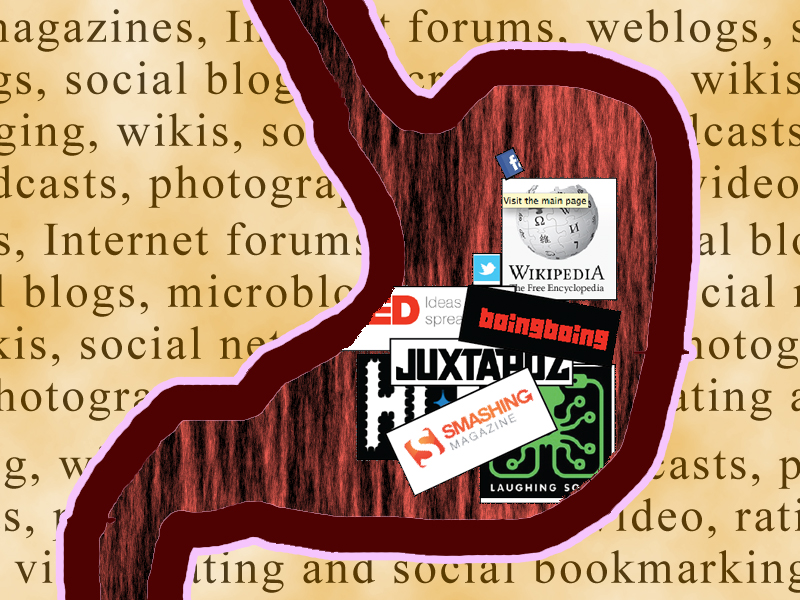
Information literacy, technology, and digital media engulf our everyday lives. Navigating through each can be overwhelming and discouraging, especially if we do not know how to properly traverse through the information overload. For me, I know this is how I feel oftentimes when I am feeling rather “hungry” for information. I found a lot of insight in the “rules of thumb” from Valenza’s (2016) article. The most prominent features for me include:

  • Suspect the sensational– exaggerated, emotional text should cause skepticism
  • Think outside the reliability box– unlikely voices can be accurate and authoritative, given the need
  • Triangulate– verify information with multiple sources
  • Be suspicious of pictures– images can be easily distorted, manipulated, or digitally born digital

The Framework for 21st Century Learning (2015) details the “skills, knowledge, and expertise” that students need to “succeed in work and life,” (para. 1), including literate skills within information, media, and ICT (information, communications, and technology).

The Framework highlights in information literacy that students should be able to have access to and evaluate information efficiently, effectively, critically, and competently. By practicing metaliteracy, the Association of College and Research Libraries (ACRL) (2016) suggests that through information literacy students will be compromised with “abilities in which [they] are consumers and creators of information…in collaborative spaces.” Through metaliteracy, students will be armored with six key concepts that include: determining authority, understanding that the creation of information is a process, understanding that information is valuable, using inquiry in research, promoting scholarships as conversations, and strategically exploring information (para. 3).

For media literacy, the Framework explains how students should be able to analyze media by examining and valuing points of view and understand how to use and interpret products of the media. Gungor and McHargue (2017) display in their podcast how there is a current “strange media nihilism” that is causing many people to away from news due to the vast amount of absurdity in fake news.

With ICT, the Framework relates that students should be able to use and apply technology for communication and research purposes. Students should obtain the ability to use and communicate with others the skills and competencies they have learned through their research. According to the Big6, the skills provided are necessary when students need to “solve a problem, make a decision, or complete a task,” which fits perfectly with ICT. In short, the Big6 skills allow students use and apply technology and communication with others to identify a problem, determine and select viable resources, locate and access information from those sources, engage with and extract necessary information, organize and present their findings, and evaluate the effectiveness and efficiency of the outcome.

For me, the biggest gain from this week’s readings, resources, and podcast was understanding how the concepts of information, technology, and digital media all intersect and blend cohesively by creating literate doers of the world who can identify, evaluate, validate, and synthesize problems, resources, and their findings accurately, effectively, and efficiently while utilizing their creativity, critical thinking skills, and problem-solving skills. This all made me realize how much I need to exercise my own skills and implement an information diet for myself!

My information diet (which needs to be refreshed and “healthier”) currently consists of teacher blogs, subreddits about libraries, books and world news, librarian tweets, and news apps. I believe the information diet of a school librarian could still include these but become more diligent in consuming more information about libraries and information withing journals and associations reflecting library science and information. Not only that, but also becoming cognizant of and utilizing skills needed to verify sources and use the “rules of thumb”.

References

Association of College Research Libraries. (2016, January 11). Framework for information literacy for higher education. http://www.ala.org/acrl/sites/ala.org.acrl/files/content/issues/infolit/framework1.pdf

Gungor, M., & McHargue, M. (Hosts). (2017, March 7). Fake News & Media Literacy [Audio podcast episode]. In The Liturgists Podcast. The Liturgists. Retrieved from https://theliturgists.com/podcast/2017/3/7/fake-news-media-literacy

Partnership for 21st Century Learning. (2015, May). Framework for 21st Century Learning. https://learn-us-east-1-prod-fleet01-xythos.s3.us-east-1.amazonaws.com/5dd6acf5e22a7/11839738?response-content-disposition=inline%3B%20filename%2A%3DUTF-8%27%27P21_framework_0515.pdf&response-content-type=application%2Fpdf&X-Amz-Algorithm=AWS4-HMAC-SHA256&X-Amz-Date=20200201T011057Z&X-Amz-SignedHeaders=host&X-Amz-Expires=21600&X-Amz-Credential=AKIAZH6WM4PLTYPZRQMY%2F20200201%2Fus-east-1%2Fs3%2Faws4_request&X-Amz-Signature=aa07b300b4341f58b1a53e27eb0676514909266297015bbe63135854b18a0d63

Valenze, J. (2016, November 26). Truth, truthiness, and triangulation: A news literacy toolkit for a “post-truth” world. School Library Journal. http://blogs.slj.com/neverendingsearch/2016/11/26/truth-truthiness-triangulation-and-the-librarian-way-a-news-literacy-toolkit-for-a-post-truth-world/

Featured

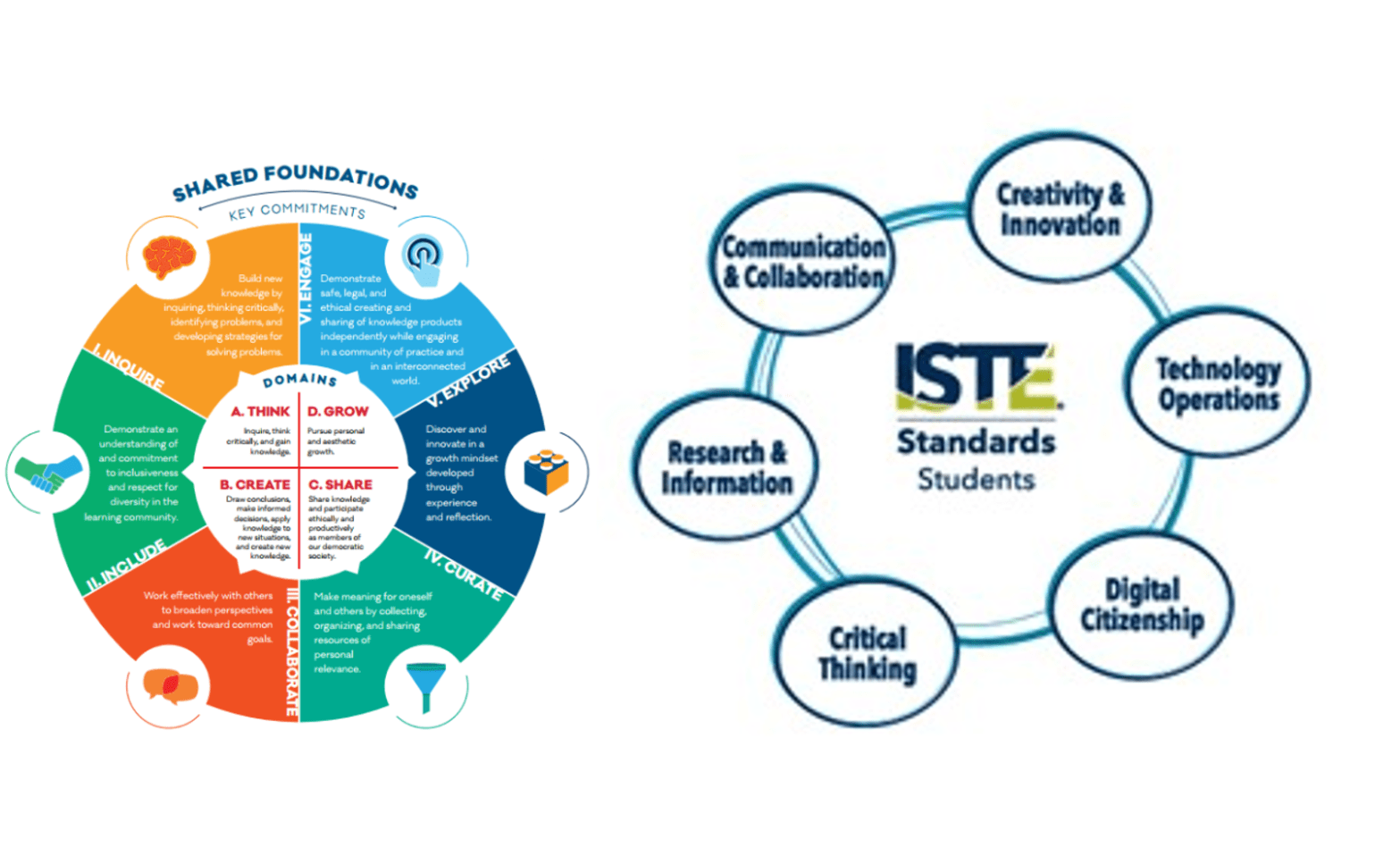
A Comparison of the AASL and ISTE Standards

Being in my fourth year of teaching, I have come to understand and adapt myself around the importance of using standards to promote student learning. Upon examining the AASL and ISTE standards, it became even clearer to me the overwhelming impact these standards can have on student learning. When I say “student learning” I am not just speaking academically, but also by obtaining life skills necessary to have in order to be a contributing, engaging, and collaborative thinker within society.

Technology is constantly and consistently evolving and is a part of most everyone’s daily life in some way or another. Preparing students to obtain and utilize technological and digital skills is critical to have as a 21st century citizen. Gerakois (2016) explains how the Future Ready Schools (FRS) initiative suggests “school librarians as likelly leaders in the digital transformation of learning” and FRS are “developing resources and strategies to help librarians fulfill this vital role,” (para. 2). As a school librarian, it is important that these skills be identified and taught to students.

The AASL and ISTE standards are both very important and powerful tools for school librarians to utilize in school libraries. When viewing the Crosswalk between the AASL and ISTE standards, it becomes quite clear the similarities and differences between the two standards. Both standards have a high emphasis on student inquiry, where critical thinking promotes identifying and solving problems. The two standards share a great importance on collaboration as well, envisioning that students can work with others to expand their perspectives and work together towards goals. Both standards put an emphasize on exploration, too, aspiring to have students’ experiences broaden as they learn. Being engaged is another similarity between the two standards, where students share and communicate with others what they are doing and have learned.

A difference between the two standards is that ISTE does not place too much emphasis on inclusion during the learning process. Learning networks that enable the learning process is prominent and Lewis explains that ISTE’s version of inclusion is more aligned with STEM/STEAM endeavors (2019). AASL, however, puts a great deal of emphasis on inclusion during the learning process as promotes unbiased perspectives, awareness of other perspectives, and building empathy for diversity. It seems ISTE’s standards primarily focus on inclusion of technologies whereas AASL’s standards lean more toward inclusion of others.

Another difference is the lack of standards ISTE has with curating. Tools, platforms, prototypes and other methods are used to “create collections of artifacts” through digital resources (American Association of School Libraries, p. 4), promoting the standard through technology, yet again. AASL is geared more towards understanding which information is needed to be preserved, using appropriate resources to collect and contribute to the information, and deeming the appropriateness of the curated information.

In conclusion, both standards seem like a great tool for school librarians to use, although not separately. When combined, the AASL and ISTE standards could prove to be a powerful tool since they are both, in their own ways, “learner-determined” (O’Connor, 2019). Just like most things, especially in the educational world, pulling from multiple sources is usually better than sticking to just one tool or resource. Therefore, using both standards to compliment and prepare the school library and all its users, any school librarian can accomplish teaching social and technological skills that all students need to be equipped for the 21st century.

References

American Association of School Librarians. (2018). National school library standards crosswalk with ISTE standards for students and educators. https://standards.aasl.org/wp-content/uploads/2018/08/180828-aasl-standards-crosswalk-iste.pdf

Gerakois, J. (2016, July 25). Are you a future ready librarian? Knowledge Quest. https://knowledgequest.aasl.org/future-ready-librarian/

Lewis, C. (2019). Leveraging crosswalks for communication. Knowledge Quest 47(5), 42-43.

Design a site like this with WordPress.com
Get started